Text Generation
Generate text with decoder-only language models like Phi-3 and DeepSeek-R1, with built-in streaming support.
See the overview for background on how autoregressive generation differs from single-pass inference.
Quick example
try (var generator = TextGenerator.builder()
        .model(ModelSources.phi3Mini())
        .build()) {
    System.out.println(generator.generate("What is Java?").text());
}
Full example
import io.github.inference4j.generation.GenerationResult;
import io.github.inference4j.genai.ModelSources;
import io.github.inference4j.genai.nlp.TextGenerator;

public class TextGeneration {
    public static void main(String[] args) {
        try (var generator = TextGenerator.builder()
                .model(ModelSources.phi3Mini())
                .maxLength(200)
                .temperature(0.7)
                .build()) {

            GenerationResult result = generator.generate("What is Java in one sentence?");

            System.out.println(result.text());
            System.out.printf("%d tokens in %,d ms%n",
                    result.generatedTokens(), result.duration().toMillis());
        }
    }
}
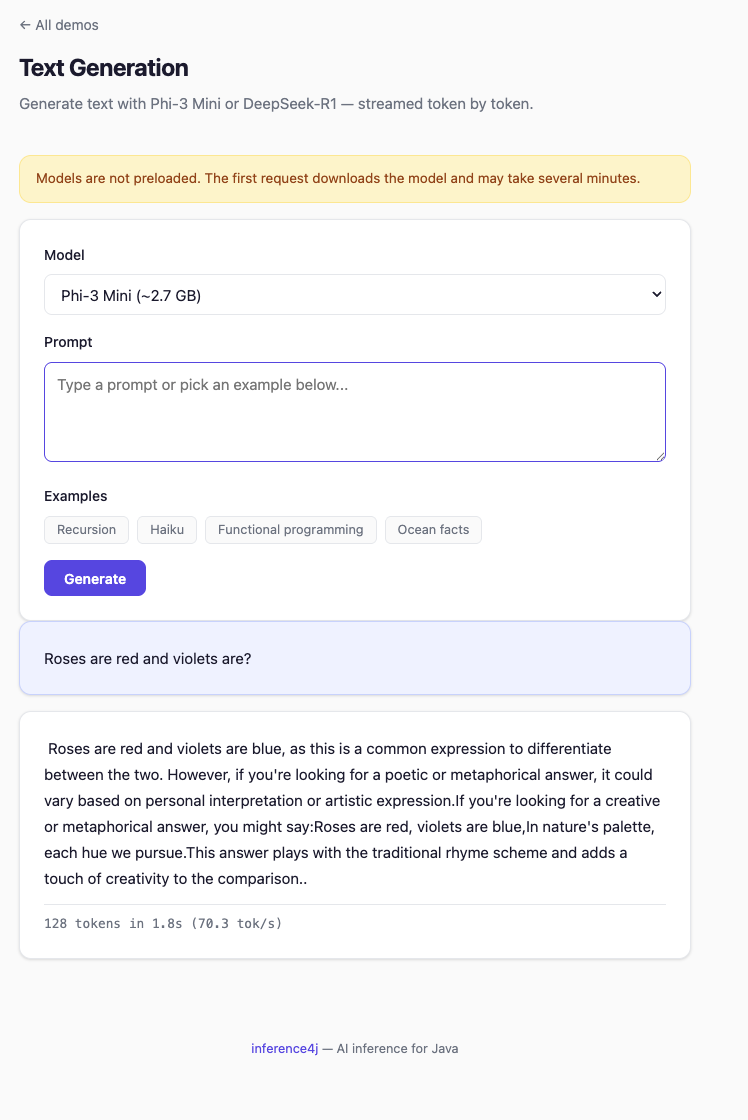
Streaming
Pass a Consumer<String> to receive tokens as they are generated:
try (var generator = TextGenerator.builder()
        .model(ModelSources.deepSeekR1_1_5B())
        .maxLength(200)
        .build()) {
    generator.generate("Explain recursion in simple terms.", token -> System.out.print(token));
}
The final GenerationResult is still returned after generation completes, containing
the full text and timing information.
Builder options
| Method | Type | Default | Description |
|---|---|---|---|
.model(GenerativeModel) |
GenerativeModel |
— | Preconfigured model from ModelSources |
.modelSource(ModelSource) |
ModelSource |
— | Custom model source (requires .chatTemplate()) |
.chatTemplate(ChatTemplate) |
ChatTemplate |
— | Prompt formatting for custom models |
.maxLength(int) |
int |
1024 |
Maximum number of tokens to generate |
.temperature(double) |
double |
1.0 |
Sampling temperature (higher = more random) |
.topK(int) |
int |
0 (disabled) |
Top-K sampling (keep K most probable tokens) |
.topP(double) |
double |
0.0 (disabled) |
Nucleus sampling (keep tokens summing to P probability) |
Result type
GenerationResult is a record with three fields:
| Field | Type | Description |
|---|---|---|
text() |
String |
The generated text |
promptTokens() |
int |
Number of tokens in the input prompt (0 if unknown) |
generatedTokens() |
int |
Number of tokens generated |
duration() |
Duration |
Wall-clock generation time |
How it works
TextGenerator formats the prompt using the model's chat template, then delegates to
onnxruntime-genai for tokenization, the autoregressive generation loop, and decoding.
flowchart LR
    A["User prompt"] --> B["ChatTemplate<br>format prompt"]
    B --> C["onnxruntime-genai<br>tokenize → generate → decode"]
    C --> D["GenerationResult"]
See the overview for a detailed explanation of the generation loop, KV cache, and why this architecture differs from single-pass wrappers.
Tips
- Generation speed scales with model size. DeepSeek-R1 (1.5B) is noticeably faster than Phi-3 (3.8B) on the same hardware.
- Lower
maxLengthfor short answers — it bounds the generation loop. temperaturebelow 1.0 gives more focused output; above 1.0 gives more varied output.- Reuse
TextGeneratorinstances across prompts — each one holds the model in memory.